
Disclosure: This post contains Amazon affiliate links. We may earn a small commission if you buy through our links — at no extra cost to you.
ASUS’s ROG Strix lineup has always lived in the sweet spot of gaming laptops.
Not the most extreme. Not budget either. Just solid, reliable gaming performance — delivered in a package that actually looks good and doesn’t empty your bank account.
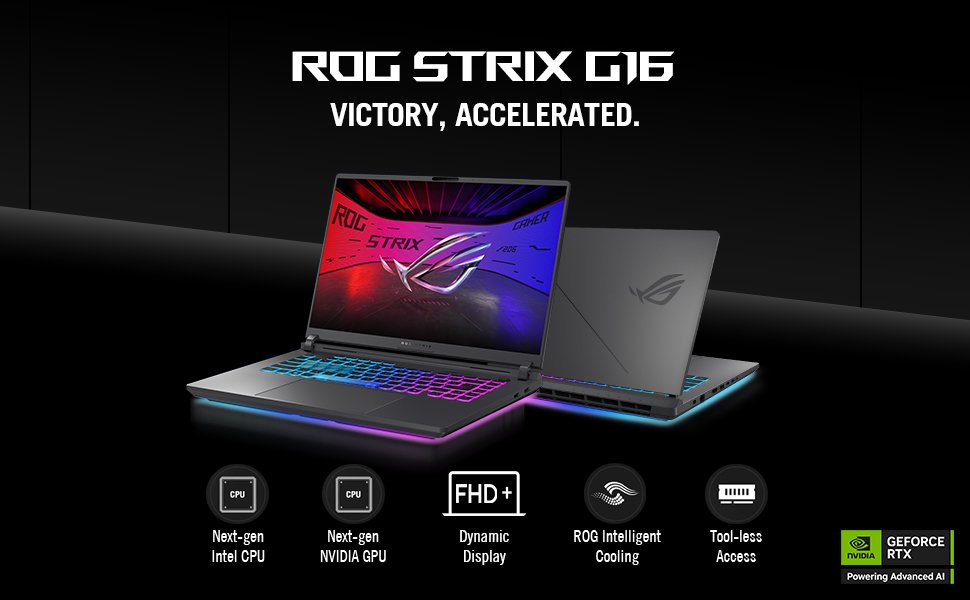
The ASUS ROG Strix G16 (2025) continues that tradition. It pairs NVIDIA’s latest RTX 5060 Blackwell GPU with an Intel Core i7-14650HX, a sharp 16-inch 165Hz FHD+ display, Wi-Fi 7, and ASUS’s proven ROG Intelligent Cooling — all in one of the best-built mid-range gaming chassis on the market.
But is it the right laptop for YOU?
We’ve dug into the real numbers — actual game benchmarks, thermal data, and hands-on feedback — so you can decide with confidence.
Quick Verdict
The ASUS ROG Strix G16 (2025) is a well-rounded, high-performance gaming laptop that hits the mid-range market right in the bullseye.
The RTX 5060 with DLSS 4 handles 1080p gaming at high-to-ultra settings with impressive frame rates. The cooling system is genuinely excellent — tri-fan technology and liquid metal on the CPU keep temperatures in check even in long gaming sessions. And the build quality is a step above most laptops at this price.
The display is the one area where we’d love more — 1080p is fine, but competitors at this price are moving to 1440p. And the i7-14650HX is a 14th-gen chip rather than the newest Intel generation.
Those caveats aside — if you want a powerful, well-cooled, reliable gaming laptop with next-gen GPU architecture — the ROG Strix G16 (2025) makes a very strong case for itself.
Best for: Gamers who want RTX 5060 performance in a proven, premium ROG chassis with excellent cooling. Not ideal for: Buyers who need a 1440p or OLED display, or who want the very latest CPU generation.

- HIGH-LEVEL PERFORMANCE – Unleash power with Windows 11 Home, an Intel Core i7 Processor 14650HX, and an NVIDIA GeForce R…
- FAST MEMORY AND STORAGE – Multitask seamlessly with 16GB of DDR5-5600MHz memory and store all your game library on 1TB o…
- DYNAMIC DISPLAY AND SMOOTH VISUALS – Immerse yourself in stunning visuals with the smooth 165Hz FHD+ display for gaming,…
Full Specs — ASUS ROG Strix G16 (2025)
| Spec | Detail |
|---|---|
| CPU | Intel Core i7-14650HX (16 cores, 24 threads, up to 5.2GHz) |
| GPU | NVIDIA GeForce RTX 5060 Laptop GPU — 8GB GDDR7 |
| GPU Architecture | NVIDIA Blackwell — DLSS 4, Max-Q |
| GPU TGP | Up to 115W |
| RAM | 16GB DDR5-5600 (2× 8GB SO-DIMM, upgradeable) |
| Storage | 1TB PCIe Gen 4 NVMe SSD + extra M.2 slot |
| Display | 16″ FHD+ (1920×1200), 165Hz, 3ms, 16:10, IPS |
| Display Features | ACR anti-glare film, G-Sync, ~350 nits brightness |
| Cooling | Tri-Fan Technology, end-to-end vapor chamber, Conductonaut Extreme liquid metal |
| Battery | 90Wh, ~4–6 hours everyday use |
| Wi-Fi | Wi-Fi 7 (Intel BE200) |
| Bluetooth | 5.4 |
| Keyboard | Per-key RGB backlit, esports-ready layout |
| Audio | Dolby Atmos dual speakers |
| Lighting | Customizable RGB Aura Light Bar |
| Ports | 1× USB-C (PD + DP 1.4 + G-Sync), 1× USB-C 3.2 Gen 2 (PD + DP 1.4), 3× USB-A 3.2 Gen 2, 1× HDMI 2.1, 1× RJ-45 Ethernet, 1× 3.5mm audio |
| Camera | 1080p IR camera |
| OS | Windows 11 Home |
| Weight | 5.84 lbs (2.65 kg) |
| Dimensions | 13.94″ × 10.55″ × 1.21″ |
| Included | 280W AC adapter + 3 months PC Game Pass |
⚠️ Price verified on Amazon — May 2026. Always click through to confirm the latest deal.
Design & Build: Sleek, Tough, and Premium
Open the box and the first thing you’ll notice is that the ROG Strix G16 doesn’t look like a typical gaming laptop.
Where most gaming machines go all-in on aggressive styling, the Strix G16 takes a more restrained approach. The lid is clean aluminum with a subtle dot-matrix pattern and the ROG logo — no over-the-top design elements. It looks like a serious machine, not a toy.
The build is a mix of aluminum on the lid and reinforced plastic on the base. It’s solid and well-fitted — no flex, no creaking. At 5.84 lbs, it’s not the lightest laptop in this class, but it feels premium in hand.
One feature that stands out immediately: tool-free access to RAM and storage.
Pop open the bottom panel without any screws, and you can upgrade the RAM or add a second SSD yourself. This kind of accessibility is rare at this price and makes the Strix G16 a smarter long-term investment. If you start with 16GB and want to upgrade to 32GB later, it takes about five minutes.
The RGB Aura Light Bar runs along the rear edge and syncs with ROG peripherals. The per-key RGB keyboard adds more customization. If you like RGB, the G16 has you covered. If you don’t care, it’s easy to turn off or dial back.
The port selection is excellent — especially for a 16-inch laptop:
- USB-C with DisplayPort + G-Sync for external display
- Three USB-A 3.2 Gen 2 ports (10Gbps each)
- HDMI 2.1 for your TV or monitor
- Dedicated RJ-45 Ethernet for wired gaming
- 1080p IR camera for Windows Hello login
This is one of the most complete port setups in the mid-range gaming laptop category. You won’t need a hub for most setups.
The Display: Sharp, Smooth, and Glare-Free
The ROG Strix G16 uses a 16-inch FHD+ (1920×1200) IPS panel at 165Hz with a 3ms response time.
Let’s start with the positives — because there are real ones.
The 16:10 aspect ratio gives you more vertical screen real estate than a standard 16:9 panel. That taller canvas is great both in games (you see more of the environment) and in everyday tasks like browsing and documents.
The 165Hz refresh rate with G-Sync is smooth and tear-free. Fast-paced games feel incredibly fluid at this refresh rate — the 3ms response time keeps ghosting essentially invisible. This display is highly capable for competitive gaming.
ASUS includes an ACR (anti-reflective coating) film on the panel. It genuinely works. In a bright office or near a window, the G16’s screen remains comfortable and clear where glossy panels would blind you with reflections. Tested at around 350 nits of brightness — solid for indoor use.
The honest limitation: It’s a 1080p display.
At 16 inches, 1920×1200 is perfectly serviceable — sharp enough for gaming and everyday tasks. But many rivals at this price are now offering 1440p (2560×1600) panels, which provide noticeably more pixel density and a more immersive gaming image.
If display sharpness is a top priority, note that ASUS offers higher-end Strix G16 configurations with 2.5K 240Hz displays. For the base i7/RTX 5060 configuration reviewed here, the 165Hz FHD+ panel is a good match for the GPU — the RTX 5060 is better suited to 1080p gaming than pushing 1440p at high frame rates anyway.
Bottom line on the display: It’s fast, smooth, glare-resistant, and perfectly matched to the GPU inside. The resolution is the only real complaint.
Performance: Real Benchmark Numbers
This is where the ROG Strix G16 (2025) truly earns its price.
The combination of an Intel Core i7-14650HX (16 cores, 24 threads, up to 5.2GHz) and an RTX 5060 with 8GB GDDR7 running at up to 115W TGP gives this laptop serious gaming firepower.
What Is DLSS 4 and Why Does It Matter?
Before the benchmarks — a quick explanation of the biggest performance multiplier on this laptop.
DLSS 4 (Deep Learning Super Sampling 4) is NVIDIA’s latest AI upscaling technology, exclusive to RTX 50-series GPUs. It uses the Blackwell AI cores to render the game at a lower resolution and then reconstruct a sharp, higher-quality image in real time.
The result: dramatically more frames per second with very little visual quality loss. In supported games, DLSS 4 can double or triple your frame rate compared to native rendering. This is not a gimmick — it’s one of the most impactful gaming technologies available today, and the RTX 5060 is the first mid-range laptop GPU to fully support it.
Real-World Gaming Benchmarks (1920×1200, Native Resolution)
All benchmarks below are at the display’s native 1920×1200 resolution.
| Game | Settings | FPS (DLSS OFF) | FPS (DLSS ON) |
|---|---|---|---|
| Cyberpunk 2077 | Ultra, no ray tracing | ~93 FPS avg | ~120+ FPS |
| Cyberpunk 2077 | Ultra + Ray Tracing | ~36 FPS avg | ~60+ FPS |
| Redfall | Epic preset | ~86 FPS avg | — |
| Shadow of the Tomb Raider | Highest settings | ~110 FPS avg | — |
| Forza Horizon 5 | Ultra settings | 75–100 FPS | — |
| Red Dead Redemption 2 | Ultra settings | 75–90 FPS | — |
| Hogwarts Legacy | High settings | ~60–75 FPS | ~90+ FPS |
| CS2 / Valorant | Medium-High | 150–200+ FPS | — |
What do these numbers mean in plain terms?
Every major 2024–2025 AAA game runs at 60 FPS or above at the highest settings on this screen — with no DLSS needed. Turn DLSS 4 on and you’re comfortably above 100 FPS in most titles. For competitive games, you’re well above 144 FPS, making full use of the 165Hz display.
The 3DMark Time Spy score of approximately 12,960 is particularly telling. That’s better than last year’s RTX 4060-equipped Strix G16, and competitive with some RTX 4070 laptops from the previous generation. The RTX 5060 with GDDR7 and DLSS 4 is a genuine generational leap in the mid-range.
CPU Performance
The Intel Core i7-14650HX is a 14th-generation Raptor Lake processor. It’s not the newest Intel generation — that would be the Core Ultra series — but it’s no slouch.
16 cores and 24 threads handle gaming, streaming, and multitasking simultaneously without issue. Performance cores boost to 5.2GHz. For gaming, the i7-14650HX provides enough CPU headroom that it’s rarely the bottleneck — the GPU does the heavy lifting, and the CPU stays out of its way.
For content creation — video editing, rendering, 3D modeling — this CPU is capable. Don’t expect professional workstation speeds, but it handles Premiere Pro and DaVinci Resolve projects comfortably.
Cooling: Where the ROG Strix G16 Really Shines
If there’s one area where ASUS invested heavily in the Strix G16, it’s cooling.
This is not an area where they cut corners.
The G16 features:
- Tri-Fan Technology — three fans working in coordination to push air through the chassis more efficiently than a standard dual-fan design
- End-to-end vapor chamber — spreads heat across the full width of the motherboard, reducing hot spots
- Conductonaut Extreme liquid metal on the CPU — the same thermal compound used in high-end desktop builds, dramatically better at heat transfer than standard thermal paste
- Large exhaust vents along the rear and sides
The results speak for themselves. In a 3DMark stress test — which runs the GPU at 100% load for 20 minutes straight — the Strix G16 scored 99.2%. A score above 97% means virtually no thermal throttling occurred throughout the test. That’s exceptional.
In real-world gaming sessions of 3+ hours, performance stays consistent from start to finish. No frame rate drops as the machine heats up. No thermal throttling cutting your performance mid-session. What you benchmark in the first 5 minutes is what you get in hour 3.
Fan noise is present but manageable. Under gaming load, you’ll hear the three fans working. They’re not painfully loud — a good pair of headphones handles it easily. In office tasks and light browsing, the fans are nearly silent thanks to Nvidia Advanced Optimus, which switches to the integrated GPU for non-gaming tasks.
Keyboard & Audio: Built for Long Sessions
The per-key RGB backlit keyboard is one of the Strix G16’s most enjoyable aspects.
Each key is individually lit and syncs with ASUS’s Aura Sync ecosystem. The typing feel is satisfying — proper key travel, responsive actuation, and a firm, stable base that doesn’t flex under heavy typing or rapid keypresses. ASUS calls it “esports-ready” — it’s a fair description. The layout is full-size with a numpad, and the arrow keys are well-spaced.
The trackpad is smooth, accurate, and large enough for everyday navigation. Windows Precision drivers keep it responsive.
Audio is better than expected for a gaming laptop.
The dual Dolby Atmos-certified speakers fire downward from the base and reflect upward off the desk. Volume is loud and clear, with decent stereo separation. Bass is limited — as it is on any laptop — but mids and vocals are clean and present for gaming, streaming, and music.
The 3.5mm audio combo jack supports headphones and microphones. For serious audio, connect your preferred headset here rather than relying on the built-in speakers — the Dolby Atmos tuning extends to headphone audio as well.
Connectivity: Wi-Fi 7 and a Port for Everything
The Strix G16 ships with Intel Wi-Fi 7 (BE200) — the latest and fastest wireless standard available.
Wi-Fi 7 delivers theoretical peak speeds well above Wi-Fi 6E, with lower latency and better performance in crowded wireless environments. For online gaming, the practical benefit is a more stable, responsive connection. For game downloads and streaming, the bandwidth ceiling is higher than you’ll likely ever hit on a home network.
Bluetooth 5.4 handles wireless peripherals, headphones, and controllers without issue.
Wired connectivity is equally strong:
- 3× USB-A 3.2 Gen 2 (10Gbps each) for peripherals
- 2× USB-C with DisplayPort 1.4 and Power Delivery — connect monitors or charge via USB-C
- 1× HDMI 2.1 — for TVs and external monitors up to 4K@120Hz
- 1× RJ-45 Ethernet — for the fastest, most stable online gaming connection
- 1× 3.5mm audio jack
This port lineup is comprehensive. You can connect an external monitor, plug in wired peripherals, use Ethernet for gaming, and charge simultaneously — no hub needed.
Battery Life: Honest Expectations
Like all high-performance gaming laptops, the ROG Strix G16 prioritizes performance over battery endurance.
The 90Wh battery is large for this class of laptop.
Everyday use (browsing, documents, streaming at medium brightness with the dedicated GPU idle): 4–6 hours is realistic. ASUS’s Advanced Optimus technology helps here — it automatically switches to the more efficient integrated GPU for non-gaming tasks, extending battery life meaningfully.
Gaming on battery: Expect 1.5–2 hours with demanding games at high settings. Performance also drops when unplugged, as the full 115W GPU TGP requires AC power to sustain.
For gaming sessions, plug it in. For work and classes during the day, the 4–6 hour battery gets you through half a day comfortably. The included 280W AC adapter charges quickly.
Upgradability: A Major Advantage
This is something ASUS deserves real credit for.
The ROG Strix G16 is tool-free upgradeable.
No screws required to access the internals. Pop the bottom panel, and you have direct access to:
- 2× DDR5 SO-DIMM RAM slots — upgrade from 16GB to 32GB or 64GB
- 2× M.2 NVMe SSD slots — the second slot is empty, ready for a second drive
- The cooling system and fans for cleaning
This level of access is increasingly rare in gaming laptops, where manufacturers are soldering components to cut costs. The G16 treats you like an adult who might want to upgrade their own machine. A 32GB RAM kit costs around $50–$60 and can be installed in minutes.
What to upgrade first: If budget allows, adding a second 1TB or 2TB SSD in the empty M.2 slot is the most practical upgrade. AAA game libraries fill up fast. The RAM is already in dual-channel at 16GB — sufficient for current gaming, though 32GB is better for future-proofing.
ASUS ROG Strix G16 vs. The Competition
vs. Lenovo Legion 5 Gen 10 (~$1,180)
The Legion 5 Gen 10 is the closest competitor — also RTX 5060, but with a stunning OLED 2560×1600 165Hz display and Wi-Fi 7. If display quality is your absolute priority, the Legion 5 wins on screen. The Strix G16 wins on cooling pedigree, RGB customization, port variety, and the included Game Pass bundle.
vs. ASUS TUF Gaming A16 (~$949)
Both are ASUS, both run RTX 5060. The TUF A16 wins on MIL-STD-810H durability certification and has a larger 90Wh battery. The Strix G16 wins on cooling technology (vapor chamber + liquid metal vs. standard heat pipes), keyboard quality, RGB features, and overall build premium. For pure gaming performance, the Strix G16’s better thermal solution gives it a consistent edge.
vs. Lenovo LOQ 15 Gen 10 (~$809)
The LOQ 15 is cheaper and also offers RTX 5060 in a Lenovo chassis. The Strix G16 wins significantly on cooling, keyboard quality, display features (G-Sync, ACR coating), port selection, and build premium. If budget is tight, the LOQ 15 is the rational choice. If you want the better machine, the Strix G16 is worth the premium.
Who Should Buy the ASUS ROG Strix G16 (2025)?
Buy it if:
- You want a next-gen RTX 5060 GPU with DLSS 4 in a premium, well-cooled chassis
- You game for long sessions and need consistent, un-throttled performance
- You plan to upgrade RAM or add storage yourself over time
- You want Wi-Fi 7 and a comprehensive port selection without buying a hub
- You want a laptop that looks professional enough for class or work — not over-the-top gaming aesthetics
Look elsewhere if:
- A 1440p or OLED display is a must-have for you (consider the Legion 5 Gen 10)
- You want the very latest CPU generation (Intel Core Ultra series)
- You’re on a strict budget under $900 (consider the ASUS TUF A16 or Lenovo LOQ 15)
- Portability is your top concern — at 5.84 lbs, this isn’t the lightest option
Our Verdict
🎮 MesterDeals Score: 8.8 / 10
The ASUS ROG Strix G16 (2025) earns its reputation as one of the best mid-range gaming laptops you can buy right now.
The RTX 5060 Blackwell GPU with DLSS 4 is a genuine performance leap over the RTX 4060 generation. The cooling system — tri-fans, vapor chamber, and liquid metal — is class-leading for the price. The keyboard, audio, Wi-Fi 7, and port selection round out a premium package that doesn’t cut corners where it matters.
The display holds it back from a perfect score. A 1920×1200 panel is fast and smooth, but competitors are offering sharper 1440p screens at similar prices. And the i7-14650HX, while capable, is last-gen Intel.
But here’s the bottom line: if you want next-gen gaming performance in a reliable, well-built machine that will stay fast for years — the ROG Strix G16 (2025) delivers exactly that.
✅ Pros
- Next-gen RTX 5060 8GB GDDR7 — beats last-gen RTX 4070 in many tests
- DLSS 4 dramatically boosts frame rates in supported games
- Class-leading cooling — tri-fans, vapor chamber, liquid metal CPU
- Consistent un-throttled performance in 3+ hour sessions
- Wi-Fi 7 — fastest wireless standard available
- Comprehensive port selection — no hub needed
- Tool-free RAM and SSD upgradability
- Per-key RGB keyboard with satisfying key travel
- Dolby Atmos audio
- 3 months PC Game Pass included
- Clean, professional design that works outside a gaming context
❌ Cons
- FHD+ 1080p display — competitors offer 1440p at similar prices
- i7-14650HX is 14th-gen, not the latest Intel Core Ultra
- At 5.84 lbs, not the most portable option
- Base 16GB RAM — upgrade to 32GB recommended for future-proofing
- Fan noise under heavy gaming load (manageable with headphones)
- HIGH-LEVEL PERFORMANCE – Unleash power with Windows 11 Home, an Intel Core i7 Processor 14650HX, and an NVIDIA GeForce R…
- FAST MEMORY AND STORAGE – Multitask seamlessly with 16GB of DDR5-5600MHz memory and store all your game library on 1TB o…
- DYNAMIC DISPLAY AND SMOOTH VISUALS – Immerse yourself in stunning visuals with the smooth 165Hz FHD+ display for gaming,…
Frequently Asked Questions
Is the ASUS ROG Strix G16 (2025) worth buying?
Yes — especially if you want next-gen RTX 5060 performance in a laptop with premium cooling and build quality. The Blackwell GPU with DLSS 4, tri-fan vapor chamber cooling, Wi-Fi 7, tool-free upgradability, and a comprehensive port selection make it one of the best mid-range gaming laptops available. The main caveat is the 1080p display — if a 1440p screen is important to you, look at higher configurations or the Lenovo Legion 5 Gen 10.
How does the RTX 5060 compare to the RTX 4060 in gaming?
The RTX 5060 with GDDR7 memory delivers around 20–30% better raw performance than the last-gen RTX 4060. More importantly, the RTX 5060 introduces DLSS 4 — NVIDIA’s newest AI upscaling — which can double or triple frame rates in supported games. In practical terms, games that ran at 60 FPS on an RTX 4060 can reach 100–120+ FPS on the RTX 5060 with DLSS 4 enabled.
What FPS does the ROG Strix G16 get in Cyberpunk 2077?
At 1920×1200 Ultra settings without ray tracing and DLSS enabled, the Strix G16 averages around 93 FPS — a very strong result for a mid-range laptop at this resolution. With ray tracing enabled at Ultra settings and DLSS 4 on, it achieves 60+ FPS. Without DLSS and ray tracing, ray-traced Ultra settings average around 36 FPS.
Can I upgrade the RAM and SSD in the ROG Strix G16?
Yes — and it’s easy. The Strix G16 features tool-free access to the internals. There are 2× DDR5 SO-DIMM slots (base config ships with 2× 8GB) and 2× M.2 NVMe slots (one populated with the 1TB SSD, one empty). You can upgrade to 32GB or 64GB of RAM and add a second SSD without any special tools.
How long does the battery last on the ROG Strix G16?
In everyday use — browsing, documents, streaming — expect 4–6 hours with the screen at medium brightness and the dedicated GPU idle (Nvidia Advanced Optimus handles this automatically). In gaming, expect 1.5–2 hours as the RTX 5060 requires the full AC power supply to perform at its rated TGP.
Is the ROG Strix G16 good for content creation?
Yes. The Intel Core i7-14650HX handles video editing, rendering, and 3D work competently. The RTX 5060 accelerates hardware encoding in Premiere Pro and DaVinci Resolve. The display’s 100% sRGB coverage is adequate for color work, though not as accurate as a DCI-P3 panel for professional color grading. For casual to mid-level content creation alongside gaming, it’s an excellent dual-purpose machine. Upgrade to 32GB RAM for serious editing workloads.
Does the ROG Strix G16 support external monitors?
Yes. The G16 has multiple display output options: HDMI 2.1 (supports up to 4K@120Hz) and two USB-C ports with DisplayPort 1.4. You can connect up to two external monitors simultaneously, making it a capable desktop replacement when docked.
How does the ROG Strix G16 compare to the ASUS TUF Gaming A16?
Both are ASUS gaming laptops with RTX 5060. The TUF A16 is MIL-STD-810H certified and has a larger 90Wh battery — better for students who need durability. The Strix G16 has superior cooling (vapor chamber + liquid metal vs. standard heat pipes), better keyboard quality, G-Sync display, RGB features, and a more premium build. For sustained gaming performance, the Strix G16’s thermal advantage makes a real difference in long sessions.
Also read on MesterDeals:
- 💻 Best Gaming Laptops Under $1,000 in 2026 — 7 Tested & Ranked
- 🎮 ASUS ROG Ally X Review — Best Handheld Gaming PC in 2026?
Last updated: May 2026 | MesterDeals.com Price verified on Amazon. Always click through for the latest deal — prices change frequently.