
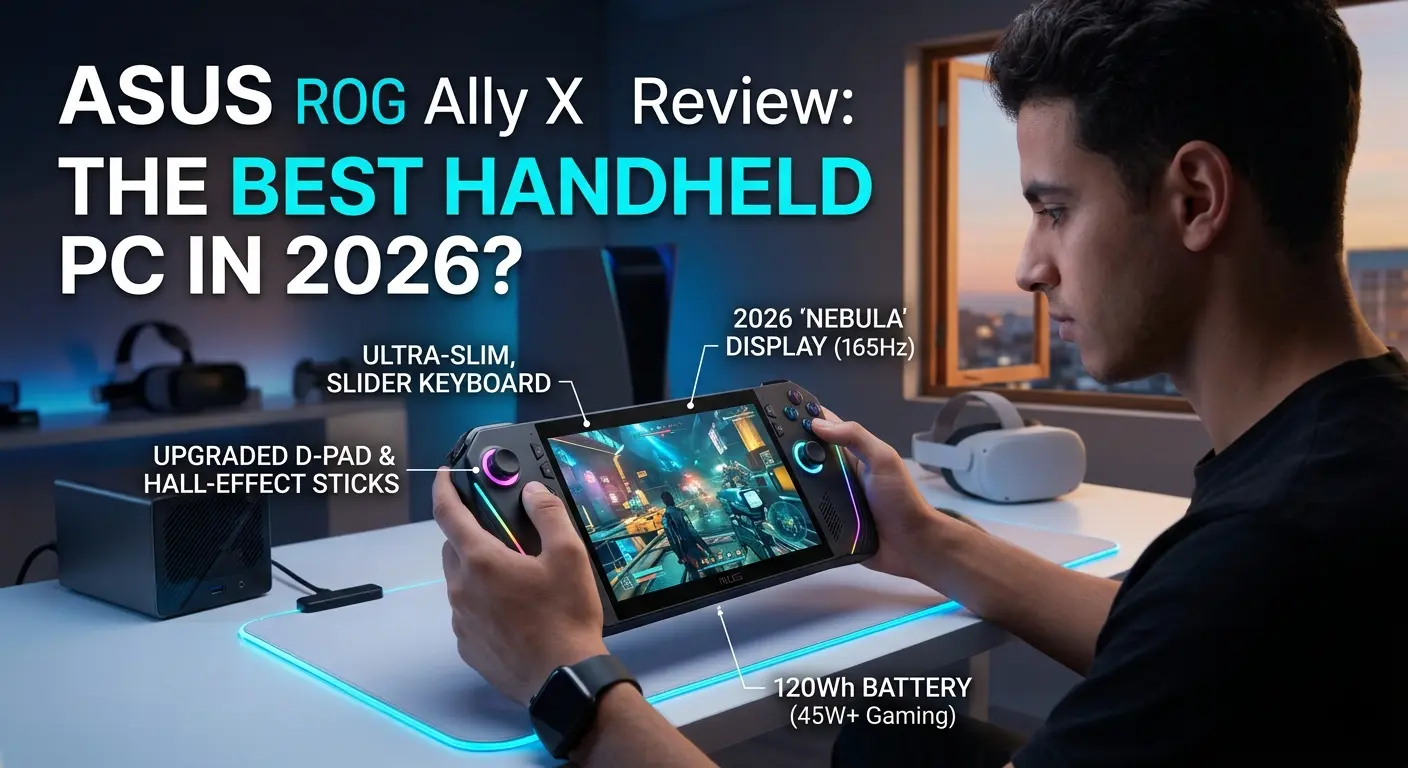
Disclosure: This post contains Amazon affiliate links. If you buy through our links, we may earn a small commission at no extra cost to you.
Two years ago, handheld gaming PCs were a curiosity. Today, they’re a genuine category — and the ASUS ROG Ally X is the device that arguably made the mainstream take notice.
The original ROG Ally launched to strong reviews but one glaring weakness: battery life so short it barely survived a single subway ride. ASUS went back and fixed it. The Ally X doubled the battery capacity, doubled the RAM, doubled the SSD, refined the ergonomics, and landed at a price that — while expensive — is competitive with what you get inside.
In 2026, the ROG Ally X family has also expanded with the ROG Xbox Ally X, a Microsoft-branded variant powered by AMD’s newer Ryzen Z2 Extreme chip and featuring Xbox’s Full Screen Experience interface. Both models share the same core DNA and are available on Amazon. We cover both in this review, along with the critical question every buyer is asking: is the ROG Ally X still worth buying in 2026, or have competitors caught up?
Quick Verdict
The ASUS ROG Ally X is the best Windows-based handheld gaming PC you can buy in 2026 if raw performance and game library flexibility are your priorities. Its combination of AMD Ryzen Z1/Z2 Extreme processing power, 24GB RAM, 1TB SSD, an 80Wh battery, and a sharp 120Hz display gives it a hardware profile that no competitor at this price fully matches. The Windows 11 platform means access to every game launcher — Steam, Xbox Game Pass, Epic Games, GOG — without compatibility workarounds.
Its limitations are real: Windows on a handheld remains more friction-filled than SteamOS on the Steam Deck, battery life in AAA games at maximum settings still ends somewhere around 2 hours, and the $799–$999 price tag puts it firmly in premium territory.
But for performance-focused gamers who want the most capable handheld gaming PC available today, the ROG Ally X delivers.
Best for: Gamers who want maximum performance, Xbox Game Pass players, multi-platform library owners (Steam + Epic + Game Pass), and anyone who wants a handheld that can also dock to a monitor as a desktop replacement.
Not ideal for: Budget-conscious buyers (Steam Deck OLED at $549 is the better value play), gamers with Steam-only libraries who hate tinkering with settings, or anyone who wants the longest possible battery life in demanding AAA titles.
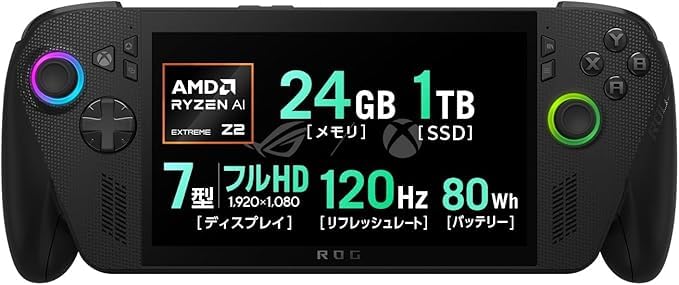
- 🖥️ High-Performance 7″ Gaming & Productivity Display | 1920×1080 Glare TFT LCD with 120Hz refresh rate delivers ultra-sm…
- ⚡ Top-Tier AMD Ryzen AI Z2 Extreme Processor | 8-core/16-thread chip paired with integrated AMD Radeon Graphics, 24GB LP…
- 🔋 Long-Lasting Battery & Flexible Power Options | 4-cell 80Wh lithium polymer battery offers up to 13.9hrs of video play…
ROG Ally X 2026: Key Specs at a Glance
| Spec | ROG Ally X (Z1 Extreme) | ROG Xbox Ally X (Z2 Extreme) |
|---|---|---|
| Price | ~$799 | ~$999 |
| CPU | AMD Ryzen Z1 Extreme | AMD Ryzen AI Z2 Extreme |
| GPU | AMD RDNA 3 | AMD RDNA 3.5 |
| RAM | 24GB LPDDR5-7500 | 24GB LPDDR5X |
| Storage | 1TB NVMe SSD | 1TB NVMe SSD |
| Display | 7″ FHD 1080p, 120Hz, IPS | 7″ FHD 1080p, 120Hz, IPS |
| Battery | 80Wh | 80Wh |
| Battery Life (AAA gaming) | ~2–3 hours | ~2.5–3 hours |
| Battery Life (indie/light) | 4–10 hours | 5–10 hours |
| Ports | USB4 (40Gbps) + USB-C 3.2 Gen2 | USB4 + USB-C 3.2 Gen2 |
| Wi-Fi | Wi-Fi 6E | Wi-Fi 6E |
| Bluetooth | 5.3 | 5.4 |
| Weight | 678g (1.49 lbs) | 715g |
| OS | Windows 11 Home | Windows 11 + Xbox FSE |
| MicroSD | Yes | Yes |
| Audio Jack | 3.5mm combo | 3.5mm combo |
| Speakers | Dual, Dolby Atmos | Dual, Dolby Atmos |
Design & Ergonomics: Built Like a Premium Controller
Pick up the ROG Ally X and the first thing you notice is that it feels like a proper gaming controller rather than a device that has screens bolted onto its sides. ASUS redesigned the grip ergonomics between the original Ally and the Ally X, adding rounder, more contoured grip areas that reduce hand fatigue during extended sessions.
The controller layout is immediately familiar to anyone who has used an Xbox controller: dual thumbsticks positioned diagonally (left stick above the D-pad, right stick below the face buttons), ABXY buttons on the right, and two bumpers and two triggers per side. Impulse triggers — which provide subtle haptic feedback on hits and impacts — feature on the Xbox Ally X model, borrowing directly from the Xbox Series X controller. It’s a small feature that adds a genuine tactile dimension to compatible games.
The 7-inch display is surrounded by reasonably slim bezels, and the screen is tilted slightly away from the user — a clever ergonomic detail that makes the viewing angle more natural when holding the device at arm’s length. The matte black chassis of the Ally X (versus the white of the standard Ally) contributes to a premium, purposeful aesthetic that feels appropriate for a $800–$1,000 device.
At 678g for the Z1 Extreme model and 715g for the Xbox Ally X, it’s noticeably heavier than the Steam Deck OLED’s 640g — but still roughly 50g lighter than the Lenovo Legion Go, which you’ll feel after 40 minutes of sustained play. For most sessions up to 90 minutes, the weight is comfortable. Extended sessions above two hours will make your wrists aware of what they’re holding.
Two USB-C ports sit on the top edge of the device — one USB4 (40Gbps, Thunderbolt 4 compatible on the Xbox model) and one USB-C 3.2 Gen2 (10Gbps). Both support DisplayPort Alt Mode and USB Power Delivery, meaning you can connect an external monitor or dock through either port. The microSD card slot and 3.5mm audio jack round out the port selection. One ergonomic note: both charging ports are on the top of the device, which means the charging cable exits upward during play — slightly awkward when gaming on a couch. A bottom-mounted port would be preferable.
The Display: Sharp, Fast, and Punchy
The ROG Ally X’s 7-inch, 1920×1080 IPS display at 120Hz is one of its most underrated strengths. At 315 PPI for a 7-inch screen, text and game visuals are crisp and detailed — noticeably sharper than the Steam Deck OLED’s native 800p (1280×800) resolution, though the Deck’s OLED panel delivers superior contrast and black levels.
The 120Hz refresh rate with AMD FreeSync Premium (Variable Refresh Rate) is where the Ally X genuinely earns its price. VRR eliminates screen tearing across a wide frame rate range, making even variable-framerate games look consistently smooth. At the same refresh rate and resolution, the ROG Ally X’s display makes competitive and action-heavy titles feel noticeably more responsive than 60Hz alternatives.
The display reaches 500 nits of peak brightness — competitive for indoor play and adequate for most indoor-outdoor transitional lighting. In direct sunlight, like all handheld displays, it struggles. The panel covers a solid color gamut, making games with vibrant art styles pop satisfyingly.
The one area the Steam Deck OLED beats the ROG Ally X outright is display quality in low-light and dark environments. OLED’s perfect blacks and higher contrast ratio give it an edge for atmospheric games. For action games, competitive titles, and high-frame-rate content, the Ally X’s 120Hz IPS display is the better tool.
Performance: The Benchmark Leader at This Form Factor
The AMD Ryzen Z1 Extreme (Ally X) and Ryzen AI Z2 Extreme (Xbox Ally X) are purpose-built APUs for handheld gaming — combining CPU cores and GPU compute units on a single chip optimized for power efficiency at varying TDP levels. The result is the most capable handheld gaming PC performance available in this size class.
What You Can Actually Play
At 1080p with medium settings, the ROG Ally X handles the vast majority of the modern game library at 60 frames per second or above in Performance mode (15–20W TDP). Some specific benchmarks from real-world testing paint a clear picture:
- Cyberpunk 2077 (Medium settings, FSR Quality): 40–55 FPS at 15W, 55–65 FPS at 25W
- Elden Ring (High settings): 55–60 FPS at 20W, consistent 60 FPS at 25W
- Hades II: 120 FPS consistently at any power setting
- Counter-Strike 2: 80–100 FPS at 15W on medium settings
- GTA V Online: 60+ FPS comfortably at Performance mode settings
- Indie and 2D titles: Effectively unlimited framerate within the screen’s 120Hz cap
The Ryzen Z2 Extreme in the Xbox Ally X delivers roughly a 10–15% performance improvement over the Z1 Extreme in GPU-heavy scenarios. For most games, the difference is meaningful but not dramatic — you’ll gain a few frames in demanding titles or be able to push settings slightly higher. If you’re buying new and the $200 premium doesn’t break your budget, the Xbox Ally X is the better long-term investment. If you find the Z1 Extreme Ally X at a significant discount, it remains an excellent performer.
The Windows Caveat
Performance figures are one thing. The Windows 11 experience on a handheld is another. This is the most honest thing we can tell you about the ROG Ally X: Windows is genuinely not designed for a 7-inch touchscreen controller interface, and you will feel that.
ASUS’s Armoury Crate SE software provides a console-like overlay for launching games and adjusting settings without needing to navigate the full Windows desktop. It works — but it’s not seamless. Updates, background processes, Windows Defender scans, and occasional driver quirks are part of life on a Windows handheld in a way they simply aren’t on the Steam Deck’s SteamOS.
The Xbox Ally X improves this meaningfully with the Xbox Full Screen Experience (Xbox FSE) — a console-like dashboard that finally makes a Windows handheld feel like a proper handheld console. It surfaces Game Pass, your Xbox library, and your installed games in a clean interface that’s fully navigable with the controller. It’s the best software implementation on a Windows handheld yet. Importantly, Xbox FSE is expected to come to the Lenovo Legion Go 2 in spring 2026, so it won’t remain an ROG exclusive.
If you want plug-and-play simplicity and your library is on Steam, the Steam Deck OLED is genuinely the better software experience. If you want Windows flexibility — Game Pass, Epic, mods, multiple launchers — the ROG Ally X is the price of entry.
Battery Life: The Biggest Improvement Over the Original Ally
The original ROG Ally had a 40Wh battery. At maximum performance settings, it lasted under an hour. It was the device’s most criticized limitation — and ASUS fixed it comprehensively with the Ally X.
The 80Wh battery — double the original — delivers real, usable battery life across a wider range of scenarios:
| Scenario | TDP Setting | Battery Life |
|---|---|---|
| AAA demanding titles (Cyberpunk, Elden Ring) | 25W (max) | ~1.5–2 hours |
| AAA demanding titles | 20W (Performance) | ~2.5 hours |
| Most 3D games (sweet spot) | 15–18W | ~3+ hours |
| Indie / 2D titles | 10W | ~4–5 hours |
| Lightweight games / emulation | 10W | Up to 10 hours |
| Video streaming (Netflix) | — | ~14.5 hours |
The practical takeaway: at the 15–20W TDP sweet spot — where the Z1/Z2 Extreme still delivers excellent performance in most games — you get roughly 2.5 to 3 hours of real gaming on battery. For AAA titles pushed to maximum, budget 1.5–2 hours. For indie games and lighter titles, 4–5 hours is realistic.
This is a massive improvement over the original Ally. In real-world terms, battery anxiety has gone from “I always need a power bank” to “I can game through a long flight with some settings management.” The 80Wh battery’s improvement isn’t just quantitative — it changes the psychological experience of using the device untethered.
It’s worth noting that the MSI Claw 8 AI Plus currently edges the ROG Ally X in battery benchmarks at equivalent TDP levels. For most users, the difference is marginal — but if battery life is your absolute top priority, it’s a data point worth knowing.
Fast charging: The included 65W USB-C adapter charges the device to approximately 50% in 30 minutes. A 100W charger charges faster, and both USB-C ports support charging — a convenience that lets you charge from whichever side is most practical for your setup.
Audio: Surprisingly Good for a Handheld
The dual-speaker system on the ROG Ally X, tuned by Dolby Atmos, punches above expectations for the device’s size. Stereo separation is clear, volume reaches genuinely loud levels without obvious distortion, and the speaker placement — firing forward toward the user — means audio doesn’t get muffled by your hands during play.
Bass is limited, as physics dictates for speakers this small, but the midrange is clean enough that dialogue, ambient effects, and music are all clear and enjoyable without headphones. For casual gaming in a quiet room, the speakers are adequate. For any immersive or competitive gaming, a good pair of headphones transforms the experience — the 3.5mm audio jack and the Bluetooth 5.3/5.4 connectivity both handle this well.
The built-in microphone array with AI noise cancellation functions adequately for voice chat in multiplayer games — a practical feature for Game Pass titles where crossplay and online play are common.
Connectivity & Docking: A Legitimate Desktop Replacement
One of the ROG Ally X’s most compelling use cases is as a portable device that doubles as a desktop replacement. The USB4 port (40Gbps, Thunderbolt 4 on the Xbox model) supports external GPU (eGPU) connectivity — meaning you can connect a desktop GPU enclosure at home and transform the Ally X into a genuinely powerful desktop gaming PC, then unplug and take it portable.
Even without an eGPU, connecting a USB-C dock turns the Ally X into a capable mini-PC: external monitor output up to 4K@60Hz, Ethernet via a dock, keyboard and mouse, and USB-A peripherals all function through a single cable. The ROG XG Mobile ecosystem (ASUS’s proprietary eGPU system) also supports the Ally X for users who want a dedicated docking solution.
Wi-Fi 6E delivers excellent wireless performance — in testing it consistently maxed out 300Mbps+ internet connections and maintained stable connections at greater range than some smartphones. For game downloads, cloud gaming, and online multiplayer, wireless performance is a non-issue.
ROG Ally X vs The Competition: Who Wins in 2026?
ASUS ROG Ally X vs Steam Deck OLED
| ROG Ally X (~$799) | Steam Deck OLED (~$549) | |
|---|---|---|
| Performance | Significantly higher | Moderate — optimized for efficiency |
| Game library | All launchers (Steam, Epic, Game Pass, GOG) | Primarily Steam (with workarounds for others) |
| Software experience | Windows 11 — flexible but frictional | SteamOS — seamless, console-like |
| Display | 7″ 1080p 120Hz IPS | 7.4″ 800p 90Hz OLED |
| Battery (AAA gaming) | ~2–3 hours | ~2.5–4 hours |
| Battery (light gaming) | 4–10 hours | 4–6 hours |
| Weight | 678g | 640g |
| Price | $799 | $549 |
Choose ROG Ally X if: You play across multiple storefronts, you want 1080p 120Hz performance, you’re a Game Pass subscriber, or you want to dock to a monitor as a secondary PC.
Choose Steam Deck OLED if: Your library is on Steam, you hate dealing with Windows updates and software quirks, you want a more effortless handheld gaming experience, or you want to spend $250 less.
ASUS ROG Ally X vs Lenovo Legion Go
The Legion Go brings an 8.8-inch QHD+ display and detachable TrueStrike controllers — unique features the Ally X doesn’t offer. The larger screen is genuinely better for strategy games, emulation, and any game where screen real estate matters. The detachable controllers also enable a unique “desktop mode” where you set the screen flat like a small monitor and use the detached controllers.
The ROG Ally X wins on ergonomics (significantly lighter, more comfortable in-hand for extended sessions), form factor portability, and — critically — the Xbox Full Screen Experience on the Xbox Ally X model creates a more polished software environment. The Legion Go’s Legion Space software has historically lagged behind Armoury Crate for polish.
For pure performance per dollar in a portable form factor, the ROG Ally X wins. For screen size and the unique detachable controller use case, the Legion Go has a distinct advantage.
Should You Buy the ROG Ally X or the ROG Xbox Ally X?
This is the most specific question for buyers in 2026. Here’s the honest breakdown:
ROG Ally X (Ryzen Z1 Extreme, ~$799):
- Still an excellent performer for virtually all current games
- 80Wh battery, 24GB RAM, 1TB SSD — the hardware is mature and proven
- Often available at a discount — check Amazon for current pricing
- Best value option if you find it at $699 or below
ROG Xbox Ally X (Ryzen Z2 Extreme, ~$999):
- Newest chip delivers 10–15% GPU performance improvement
- Xbox Full Screen Experience is the best handheld UI on Windows
- Impulse triggers add haptic feedback for compatible games
- Thunderbolt 4 compatibility on the primary USB-C port
- Worth the $200 premium if you’re buying new and want future-proofing
For buyers who find the Z1 Extreme Ally X at $699 or below, it’s a compelling value — the performance gap between the two chips doesn’t justify the full $200 premium at MSRP. For buyers purchasing new at full price, the Xbox Ally X is the better long-term investment.
Our Verdict
🎮 MesterDeals Rating: 9.0 / 10
The ASUS ROG Ally X is the best Windows handheld gaming PC available in 2026 — and in the broader category, it’s the right choice for anyone who wants maximum performance and multi-platform game library flexibility. The 80Wh battery transformed it from a device that needed a power cord to one you can actually take places. The 120Hz 1080p display, 24GB RAM, and 1TB SSD give it hardware headroom that competitors at this price struggle to match.
The 9.0 rather than a perfect score reflects Windows’ ongoing friction as a handheld OS, battery life that — while dramatically improved — still falls short of what a Steam Deck OLED delivers at equivalent gaming loads, and a price point that demands serious commitment. This is a premium device, and it should be evaluated as one.
For the gaming PC enthusiast who wants their entire library in their hands, the ROG Ally X delivers exactly that.
Pros
- ✅ Best-in-class performance for a handheld Windows gaming PC
- ✅ 80Wh battery — double the original Ally, transforms usability
- ✅ 24GB RAM future-proofs the device for memory-hungry titles
- ✅ 120Hz 1080p display with FreeSync Premium (VRR)
- ✅ Access to all game launchers — Steam, Game Pass, Epic, GOG
- ✅ USB4 port enables eGPU and high-bandwidth dock support
- ✅ Excellent ergonomics — comfortable Xbox-style controller layout
- ✅ Dolby Atmos dual speakers — genuinely good for a handheld
- ✅ Xbox Full Screen Experience (Xbox Ally X) — best handheld UI on Windows
Cons
- ❌ Windows 11 adds friction — updates, background processes, setup overhead
- ❌ AAA battery life at max settings still ~2 hours — bring a charger
- ❌ Premium price — $799–$999 is a significant investment
- ❌ Charging ports on the top edge — awkward cable routing during couch play
- ❌ Heavier than Steam Deck OLED and original ROG Ally
- ❌ No OLED display — Steam Deck OLED wins on contrast and visual richness
Frequently Asked Questions
Is the ASUS ROG Ally X worth buying in 2026? Yes — if you want the best-performing Windows handheld gaming PC at this price. The ROG Ally X delivers 1080p 120Hz gaming, full access to all game storefronts, 24GB RAM, 1TB SSD, and a substantially improved 80Wh battery. For gamers who use Xbox Game Pass, play across multiple platforms, or want to dock the device as a desktop replacement, it’s a compelling package. If your library is Steam-only and you prioritize software simplicity, the Steam Deck OLED at $549 is better value.
How long does the ROG Ally X battery last? Battery life varies significantly by TDP setting. At maximum performance (25W), demanding AAA games last approximately 1.5–2 hours. At the 15–18W sweet spot used for most gaming, expect 2.5–3+ hours. Lighter indie games and 2D titles at 10W can last 4–10 hours. Video streaming without active gaming delivers up to 14.5 hours.
What’s the difference between the ROG Ally X and ROG Xbox Ally X? The ROG Xbox Ally X uses AMD’s newer Ryzen AI Z2 Extreme chip (vs Z1 Extreme), adds the Xbox Full Screen Experience UI, includes impulse triggers, and costs approximately $999 vs $799. Performance improves by roughly 10–15% in GPU-intensive scenarios. The Xbox FSE makes the Windows handheld experience significantly more console-like. For new buyers, the Xbox Ally X is the recommended choice. If the original Ally X is significantly discounted, it remains an excellent performer.
Can the ROG Ally X run Game Pass games? Yes. Because it runs full Windows 11, the ROG Ally X supports Xbox Game Pass via the Xbox app — including all Game Pass titles available on PC. This is one of its key advantages over the Steam Deck, which requires workarounds (like Heroic Games Launcher) to access Game Pass titles.
Can the ROG Ally X replace a gaming laptop? For moderate gaming at 1080p, yes — particularly when docked to an external monitor. Connected to a USB-C dock with a monitor, keyboard, and mouse, the ROG Ally X functions as a capable mini desktop gaming PC. For intensive gaming at ultra settings, a dedicated laptop with a discrete GPU will outperform it. As a travel gaming device that also covers desktop gaming needs at a home dock, it’s a compelling all-in-one solution.
How does the ROG Ally X compare to the Steam Deck OLED? The ROG Ally X delivers significantly higher raw gaming performance and access to all game launchers, with a 120Hz 1080p display. The Steam Deck OLED delivers a more seamless, console-like experience via SteamOS, better battery life at equivalent gaming loads, a richer OLED display, and costs $250 less. Performance-focused gamers should choose the Ally X; library convenience and software simplicity point toward the Steam Deck.
Is the ROG Ally X good for emulation? Yes. The Ryzen Z1/Z2 Extreme chips handle emulation up to and including PS3, Wii U, and Switch (via Yuzu/Ryujinx) comfortably. Running Windows means access to the full suite of PC emulation software — RetroArch, RPCS3, Dolphin, Citra, and others — with no Linux compatibility concerns. For emulation-focused users, the ROG Ally X is arguably the most powerful emulation handheld available.
Also read on MesterDeals:
- 💻 Best USB-C Hubs for MacBook in 2026 – 7 Tested & Ranked
- 📖 Kindle Scribe Review 2026: Is It Worth Buying or Upgrading?